
Configuration
discord-mcbe splits its settings between two files:
.envcontains secrets and machine-specific values such as the bot token, Discord IDs, and listening ports.config.jsoncontains detailed settings for language, displayed text, chat filters, and scripts.
Place both next to the launcher’s start.bat or start.sh. Restart discord-mcbe after changing either file.
Environment variables
Section titled “Environment variables”DISCORD_TOKEN=your_bot_tokenGUILD_ID=123456789012345678CHANNEL_ID=123456789012345678SOCKET_PORT=3063BRIDGE_PORT=23191| Variable | Required | Default | Description |
|---|---|---|---|
DISCORD_TOKEN |
✓ | — | Bot token issued in the Developer Portal |
GUILD_ID |
✓ | — | Discord server where slash commands are registered |
CHANNEL_ID |
✓ | — | Text channel used for Minecraft chat relay |
SOCKET_PORT |
3063 |
WebSocket port used by /connect for regular worlds |
|
BRIDGE_PORT |
23191 |
Bridge port used by the BDS add-on |
config.json
Section titled “config.json”When config.json does not exist, the first start with a valid .env creates it with these defaults:
{ "config_version": 1, "check_for_updates": true, "language": "ja", "bot": { "show_death_messages": true, "allow_addon_messages": true, "reply_preview_max_length": 9, "strip_color_prefix": true, "panel_update_interval": 10000, "discord_message_filter": [] }, "bridge": { "disable_encryption": false }, "script": { "entry": "scripts/main.js" }, "translation_overrides": {}, "debug": false}| Key | Description |
|---|---|
config_version |
Configuration format version used for migration. Do not edit |
check_for_updates |
Whether to check for new versions at startup |
language |
Bot and console language: specify an available locale |
timezone_offset |
Integer-hour offset from UTC; defaults to the OS local time when omitted |
bot.show_death_messages |
Send player death messages to Discord |
bot.allow_addon_messages |
Allow other add-ons to send messages to Discord |
bot.reply_preview_max_length |
Maximum Discord reply-preview characters shown in Minecraft |
bot.strip_color_prefix |
Remove Minecraft § color codes before relaying to Discord |
bot.panel_update_interval |
Status panel refresh interval in milliseconds |
bot.discord_message_filter |
Filters applied before Discord content is sent to Minecraft |
bridge.disable_encryption |
Disable encryption for local-world connections. Normally keep false |
script.entry |
Script file imported at startup |
translation_overrides |
Map of built-in translation keys to replacement strings |
debug |
Enable debug logging |
Unknown keys are ignored with a warning. An invalid type or value stops startup and prints the affected path.
Discord message filters
Section titled “Discord message filters”Filters run on messages received in CHANNEL_ID before they are sent to Minecraft. Configure either one object or an array in application order.
Limit message length
Section titled “Limit message length”{ "on_fail": "shorten", "max_content_length": 160, "max_content_lines": 4}max_content_lengthsets the character limit.max_content_linessets the line limit.on_fail: "shorten"trims excess content and adds...on_fail: "cancel"drops the entire message.
Hide content matching a regular expression
Section titled “Hide content matching a regular expression”{ "on_fail": "replace", "ignore_pattern": "https?://\\S+"}on_fail: "replace"replaces every match with***.on_fail: "cancel"drops a message containing a match.
ignore_pattern is parsed as a JavaScript regular expression. Escape a backslash as \\ inside JSON.
Apply multiple filters in order
Section titled “Apply multiple filters in order”"discord_message_filter": [ { "on_fail": "replace", "ignore_pattern": "https?://\\S+" }, { "on_fail": "shorten", "max_content_length": 160, "max_content_lines": 4 }]The same filters also process quoted reply previews. A reply source rejected by a cancel filter is represented as ***.
Override displayed text
Section titled “Override displayed text”translation_overrides can replace individual built-in strings. Preserve placeholders such as %0 and %1.
"translation_overrides": { "minecraft.message": "§9[Discord]§r %0§r: %1§r", "discord.join": "🟢 %0 joined", "discord.leave": "🔴 %0 left"}For the full i18n model, key table, and contributor workflow, see Translation and displayed text customization.
Change connection settings
Section titled “Change connection settings”Change SOCKET_PORT in .env and connect with /connect localhost:new-port.
Create config/195cf53c-ae53-4437-82d9-a84e08694ffc/variables.json in the BDS installation folder.
Set BRIDGE_URL to the discord-mcbe WebSocket URL seen by the add-on, using the same port as
BRIDGE_PORT in .env. DEFAULT_WORLD_NAME changes the initial world name. Restart BDS after changing
these values.
variables.json belongs in the config/195cf53c-ae53-4437-82d9-a84e08694ffc/variables.json path in the BDS installation folder, not in the add-on. Use this content:
{ "BRIDGE_URL": "ws://localhost:23191"}When omitted, BRIDGE_URL defaults to ws://localhost:23191. To use Bearer authentication, see
Authenticate BDS connections.
A world name saved with /dmc:setname takes precedence over DEFAULT_WORLD_NAME.
Use webhooks for chat relay
Section titled “Use webhooks for chat relay”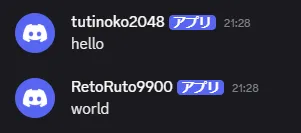
Normally, the Bot sends Minecraft chat, but you can use a webhook instead. To use one, add its URL to .env:
DISCORD_WEBHOOK_URL=https://discord.com/api/webhooks/123456789012345678/...The username contains the player name and content contains the chat message. Startup, join, leave,
status-panel, and command messages continue to be sent by the Bot.
Set a webhook icon
Section titled “Set a webhook icon”To set a custom icon, specify its URL with bot.minecraft_chat_avatar_url. In the URL, {name} is replaced
with the player name and {pfid} with the Script API Player.persistentId.
"minecraft_chat_avatar_url": "https://example.com/faces/{pfid}""minecraft_chat_avatar_url": "https://example.com/faces/{name}"